Sunday, November 17, 2013

Why the blogs are not going away...


It is Friday evening again, and you are sitting in front of your computer. It is weekly blog time, and for the umpteenth time you are wondering why I decided to inflict this torture on my students. "Science is supposed to be about experiments, not about writing. No student in the history of the world ever had to do this!"

So, why do I do I ask you to write a weekly blog?

Writing is about communicating your ideas, and making your thought process clear to your audience. You write to tell a story, to describe an event, to inform people and often, to convince them that you are right. When you write about something, you have to clarify your thoughts and organize them. It often leads to questions you did not know you had, and ideas you might be unaware that you understood.

You already write much more than you think. Every time you text, tweet, blog, e-mail and post on social networking sites, you are writing. In fact, young people now are writing more than ever before. However, developing good writing, in any form, takes time and practice. Much like with any human endeavor, you will not one day just magically wake up and be a good writer. The sooner you start developing good writing habits and skills, the better your future prospects.

How will writing weekly blogs help me in high school and college?

As a high school student you will be expected to plan, draft, and complete error-free essays of about 1,500 words. You will need to independently select the appropriate form of writing for various audiences and purposes, including narrative, expository, persuasive, descriptive, business, and literary forms. You should produce complex sentence structures, and use sophisticated vocabulary. A recent survey conducted by Pew Internet & American Life Project  reported that "More than half of the sample (58%) report having their students write short essays, short responses, or opinion pieces at least once a week. Four in ten (41%) have students journal on a weekly basis." 

This continues to build as you move on to college. As an example, Nancy Sommers,  writing scholar and long-time Director of Harvard's expository writing programs, states: "Harvard students write a lot -- an average of 13 papers freshman year, with one out of four students in the sample group writing between 16 and 22 papers. (Sommers defines a paper as five or more pages.) In addition, freshmen typically write about 14 "response papers," one- to three-page exercises designed to prepare students for longer writing assignments. Although the number of papers drops each year, the typical length of papers rises, from five to 10 pages freshmen year, to 10-15 sophomore year, 20-25 junior year, and at least twice that length senior year." 

Writing weekly blogs is nothing compared to what you will be expected to do in a few short years. If you are deliberate about doing them, and put the effort into doing a better job each time, you will get to high school and college ready to tackle the more complex writing assignments. These weekly blogs will also tell the story of your journey as a writer, increasing your confidence in your skills, and providing you with writing samples on which to build. 

How will writing weekly blogs help me in my career?

No matter where you go or what you do, you will need to write. In 2004, the National Commission on Writing conducted a study of 120 major American corporations employing nearly eight million people and concluded that “In most cases, writing ability could be your ticket in . . . or it could be your ticket out.”

Survey findings also included the following:
  • People who cannot write and communicate clearly will not be hired and tend to not last long enough to be considered for promotion. 
  • Eighty percent or more of the companies in the service, finance, insurance, and real estate sectors actually test writing during hiring.
  • Two-thirds of salaried employees in large American companies have some writing responsibility, either explicit or implicit, in their position descriptions.
  • Half of all companies take writing into account when making promotion decisions. One succinct comment: “You can’t move up without writing skills.”
When the question "Are writing skills necessary anymore?" was posed in 2011 to several executives, consultants and business leaders from various disciplines by Joyce Russell from the Washington Post, the response was "Professionals spend more time each day writing and are inundated with written communications (e-mails, reports, memos and such), so it is imperative that employees be able to write succinctly and write well."

It will not matter how bright or skilled you are at your prospective career, if you cannot express yourself clearly in writing, or if your writing is riddled with spelling and/or grammar mistakes, you will loose credibility and job opportunities. Given comparable education and skills, the person with better writing skills will most likely be hired. 

Writing your weekly blogs develops the skills you will need in order to write things like:
  • College applications
  • Personal statements
  • Financial aid applications
  • College essays, theses, and dissertations
  • Internship applications
  • Job applications
  • Résumés and cover letters
  • Internal and external e-mails
  • Formal and technical reports
  • Memos and correspondence
  • Corporate blogs
  • Client proposals and sales letters
  • Business negotiations

And yes, there's always those pesky standards...

In the Common Core State Standards there is a whole section just for writing in the content areas, which is why you are doing things like Writing Across the Curriculum, even in P.E. Your weekly blogs help determine what areas of your writing need explicit instruction. They help you practice to "Write routinely over extended time frames (time for reflection and revision) and shorter time frames (a single sitting or a day or two) for a range of discipline-specific tasks, purposes, and audiences." 

Your CCSS tests from now on will have you writing short answers and essays. For example, in 8th grade, your test booklet will have questions that look like: 
"Write an essay in which you answer these questions: In “Checkers,” Nixon argues that men who are not rich should be able to run for public office. One claim he makes implicitly is that he has served his country for many years. Another claim he makes explicitly is that he has not earned a lot of money in this service. Nixon provides a lot of facts in his speech. How does Nixon convince you that men like him, who are not rich, should be able to run for office? How relevant is his evidence, and does he provide enough evidence to show that he is not rich and yet serves his country well?"
followed by:
"At one point in his speech, Nixon quotes Lincoln, who said, "God must have loved the common people -- he made so many of them." What do you think the reference to common people means in this context? Explain what you think it might mean, as well as any historical or symbolic meanings the phrase might have in this context."
 How well do you think you will do if you have not taken the opportunity to develop your writing skills?

For those of you that have been blogging routinely since the year started, I invite you to look at your first post, and compare it to your latest one. I am sure that, like me, you can see the growth in your craft. Kudos to you.

If you belong in the group of students that tend to forget about the blogs, and wish they would just go away, know that I will not give up. Your future careers depend on it.


References:
  • Purcell, Kristen, Judy Buchanan, and Linda Friedrich. "The Impact of Digital Tools on Student Writing and How Writing Is Taught in Schools." Part II: How Much, and What, Do Today's Middle and High School Students Write? PEW INTERNET & AMERICAN LIFE PROJECT, 16 July 2013. Web. 17 Nov. 2013. <http://pewinternet.org/Reports/2013/Teachers-technology-and-writing/Main-Report/Part-II.aspx>
  • Sommers, Nancy, and Laura Saltz. "The Novice as Expert: Writing the Freshman Year."College Composition and Communication 56.1 (2004): 124-49. Web. 17 Nov. 2013. <http://faculty.salisbury.edu/~tamoriarty/compresearch/somers/sommerssaltz.pdf>.
  • NATIONAL COMMISSION ON WRITING FOR AMERIC A’S FAMILIES. Writing: A Ticket to Work or a Ticket out. Rep. College Entrance Examination Board, Sept. 2004. Web. 17 Nov. 2013. <http://www.collegeboard.com/prod_downloads/writingcom/writing-ticket-to-work.pdf>.
  • Russell, Joyce. "Career Coach: Are Writing Skills Necessary Anymore?" Washington Post. N.p., 22 May 2011. Web. 17 Nov. 2013. <http://articles.washingtonpost.com/2011-05-22/business/35265130_1_skills-applicants-business-leaders>.
  • "English Language Arts Standards » Writing » Grade 6-8." Common Core State Standards Initiative. N.p., n.d. Web. 17 Nov. 2013. <http://www.corestandards.org/ELA-Literacy/WHST/6-8>.

Thursday, November 14, 2013

How to write an option 2 blog - Science Article summary

FIND AN ARTICLE

Here are some links to good places to find articles:

WRITE YOUR SUMMARY

A summary restates the main ideas of an author in your own words. It keeps the essential information from the original passage while eliminating most supporting details, such as the examples and illustrations. A good summary makes the author's ideas clear, perhaps even clearer than in the original.

HOW TO WRITE A SUMMARY

  1. Preview the article to get an idea of what it is about. Read the title, headings, first paragraph, first sentence of the following paragraphs, and the last paragraph. 
  2. Read carefully. Write the main idea of each and also make notes about the purpose of the paragraph (For example, does it provide examples of a main point or serve as a transition to another point?) 
  3. Express in one sentence the thesis or main idea of the article. A good model for your first sentence is to include the author's name, the title, and the thesis. In "Essays to Read at the Beach," Frances Payne (discusses, states, argues). . . THESIS OF THE ARTICLE. 
  4. Write your first draft, using your notes. You can keep this draft simple by following the order of ideas in the original.
  5. Go over what you wrote and put the finishing touches (this is your final draft). Is there anything that is still unclear? Explain it.

REFLECT ON IT

In about 5 sentences, tell us how the article affects our community, the environment, the future, or us. This part explains to your reader why the topic discussed in the article matters. Describe what you see as possible effects of the research and/or give your personal opinion.

CITE IT

In order for your readers to be able to find the article and read it for themselves, it is important to provide an accurate citation. Giving the URL is not enough since there are times when URLs change or get moved. In order to simplify this, you may use http://www.easybib.com/. Enter as much information as you have and create the citation. You may then just copy/paste it into your blog.


Thursday, October 24, 2013

Tutorials: Tellagami

Tellagami is a mobile app that lets you create and share a quick (30 seconds) animated "Gami" video. If you use this for your weekly reflection blog, I suggest you use one or two for the learning piece, and then one or two more for the reflection. The app must be downloaded into your iPad or android device to use.

1. Click on Create.


2. Change the character, emotion and background to something you like. Then, click on record.


3. Click on the record button, and begin speaking. 


4. Once you finish, it will say "Analyzing your voice". Wait until it is done.


5. Click preview to see if you like it. If not, repeat from step 3.

6. When you are satisfied, click on the share button.


7. Wait while it creates the video.

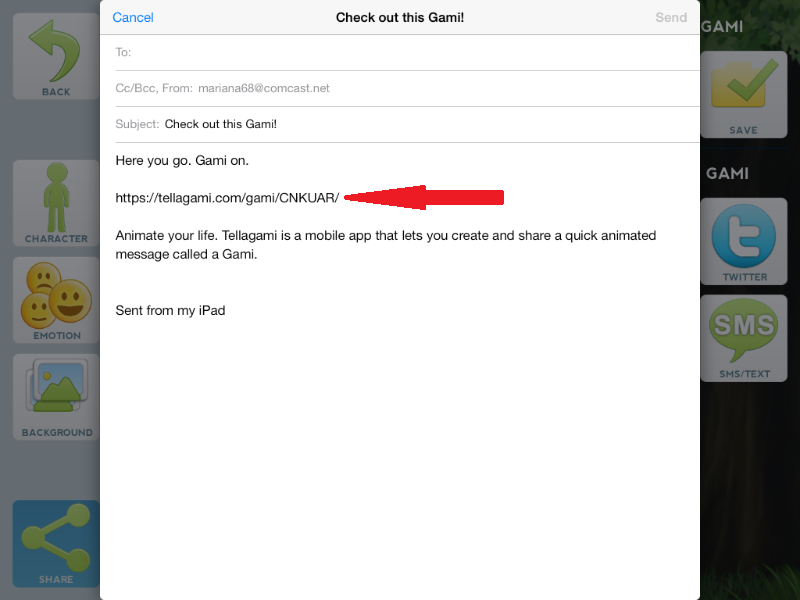
8. At this point, you may send it to yourself, and/or just copy every character into a web browser in order to access the actual video.


9. Proceed with the tutorial for embedding the video into blogger.

Sunday, October 20, 2013

Tutorial: Embedding videos in blogger

For the purposes of this tutorial, I will be using tellagami. However the process is basically the same for all videos. The key is finding that pesky embed code.

First, navigate to the URL of the product you created


Click on the share button

Highlight the embed code by left clicking on it. Then click Ctrl C.


Go to your blog, and create a post as you usually would. Make sure you include a title.

Now for the tricky part. Position yourself at the last line of your post, and click on HTML.

The HTML is now visible. Don't fret if you see a bunch of things "you did not add", you did, so do not change anything. At the very end of anything on the screen, click paste (or Ctrl V).


Make sure your addition starts with <iframe     and ends with </iframe>. Now click on Compose, and you should see the video ready to be played.


Educreations embed code:


Schooltube embed code:


Glogster embed code:


GoAnimate embed code:


Tad different since it starts with <aref   . Just make sure you copy and paste the whole thing.

Tutorials: Google Drive - Publishing your documents

I prefer that students publish their documents as soon as they create them. However, most of them are wary of publishing before the document is done. I like to compare this to giving out party invitations. When they are handed out, you are giving the location and date of the party, however your guests will not arrive until the day of the party. Same here, by giving your audience (teacher) the published link, you are just making sure that he/she has the URL on the due date, but we will not show up to grade until then. In any case, to publish your document:

1. With your document open, click on File, and then publish to the web.


2. Make sure both options are selected ("Require viewers to sign in with their Oak Grove School District account" AND "Automatically republish when changes are made"), and then click on start publishing. A pop up will appear that asks if you are sure - click Yes.


3. Left click to highlight the published document link. Then press Ctrl C to copy it.


4. Depending on how you are asked to submit the work, you can loopmail it to your teacher by logging on to schoolloop and pasting the link inside a loopmail. However, most often my AdVENTURE students will need to submit it through Edmodo to a posted assignment. The key thing you must make sure of is that the submitted URL starts with https://  and ends in /pub.

For example:

https://docs.google.com/a/oakgrovesd.net/document/d/1lJGLDhgiIqp023rc4Cs7MiaZug7P6OHDvvh2r8bDtCM/pub

Tutorials: Google Drive - Creating and sharing a document

If you have an oakgrovesd.net account you have a Google Drive account. To log in, simply navigate to Google Drive, and enter your oakgrovesd.net username and password. There are two possible screens:

1. Oakgrove School District: Enter your username without the @oakgrovesd.net. Enter your password.


2. Regular Google Drive: Enter your full oakgrovesd.net email address and password.


3. The type of assignment you wish to complete will dictate the type of document you will create. Most often you will need to create documents so I am giving instructions for it; however, the same functions apply to all. Click on the red Create button and select document from the drop down menu:


4. Give your document a name and begin drafting your assignment.

5. Drive allows you to work with other students on the same document at the same time. In order to do so, click on the blue share button.

On the sharing screen, add the complete oakgrovesd.net e-mail addresses of the people you are sharing with (separate multiple editors with commas or enter), and then click on share and save. The document should appear immediately in the shared folder of the people you added. If not, go back to share and make sure you spelled everything correctly.


6. You are now working together; YAY!

Tutorials: Blogger Posts

To post to Blogger, simply sign in with your oakgrovesd.net account.

Once you've signed in to Blogger, you'll see your dashboard with your list of blogs.


Here's what you need to do:

1. Click the orange pencil icon of the blog you want to post to.


2. Next, you'll see the Post Editor page. Start by giving your post a title (NOT optional), then enter the post itself:


3. As you continue to work,  save often. You do not want to lose anything.


4. When you're done, click the Preview button at the top to make sure it's ready to go.


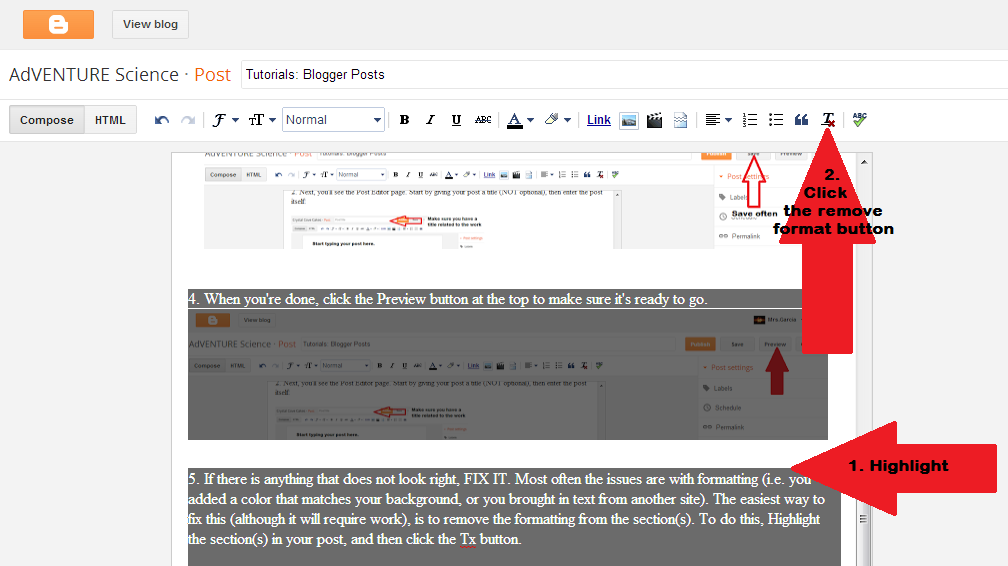
5. If there is anything that does not look right, FIX IT. Most often the issues are with formatting (i.e. you added a color that matches your background, or you brought in text from another site). The easiest way to fix this (although it will require work), is to remove the formatting from the section(s). To do this, Highlight the section(s) in your post, and then click the Tx button.

6. Reformat and click preview again until you are satisfied.

7. Click the Publish button to publish your post. Your audience will not be able to see your post until you have done this. If you are revising a post, this button will say Update. You must still click it for us to see the revised post.